


In summary
In the fashion industry, Adobe Illustrator is widely used to create and organise technical drawings. However, many of the tasks surrounding the design process remain time-consuming.
- Creating, naming and organising artboards can take up a significant amount of designers’ time.
- Large Illustrator files can take longer to open, save and transfer documents across internal networks.
- Automating certain operations helps streamline designers’ workflows without changing their creative environment.
- J2S Template Maker, developed by J2S, simplifies the organisation of Illustrator documents and the export of visual assets.
- These assets can then be combined with business data to produce technical sheets and collection overviews.
The goal is to reduce the time spent on repetitive tasks so that teams can focus more on designing and developing collections.
In the fashion industry, design teams work in an environment where collections are constantly evolving.
A garment design is modified, a new variation is added, a colourway changes or a product reference is discontinued. Each change may require adjustments to technical drawings and the documents used throughout product development.
Adobe Illustrator plays an important role in these processes. It enables designers and product development teams to create technical drawings, prepare different views of a garment and organise the visual assets associated with each product.
However, beyond the creative work itself, using Illustrator also involves numerous repetitive tasks: adding artboards, naming and rearranging them, preparing exports and managing files that can sometimes become very large.
How can these tasks be automated in Adobe Illustrator without disrupting the way creative teams work?
This is one of the challenges addressed by J2S Template Maker, a solution developed by J2S to simplify artboard management in Illustrator documents and the preparation of technical sheets during collection development.
Why do certain Adobe Illustrator tasks slow down fashion design teams?
In a fashion design department, productivity is not simply about how long it takes to draw a garment.
It also depends on all the operations required to organise content, share it with other teams and reuse it throughout collection development.
Some of these tasks may seem insignificant when performed individually. However, repeating them across numerous designs and collections can ultimately account for a substantial amount of working time.
Managing increasing numbers of artboards
In Adobe Illustrator, artboards allow users to organise multiple design areas within a single document.
For a garment, they can be used to prepare different views, variations or visual elements required during product development.
Depending on the company’s working methods, a document may therefore contain numerous sections and dozens of artboards.
Teams must create the appropriate elements, organise them correctly, assign consistent names and update them as requirements change.
When these operations are performed manually, they take up time that could otherwise be devoted to design.
Illustrator template files that can become too large
To anticipate different design requirements, some organisations use Illustrator templates that already contain every section and artboard they might need.
This avoids having to recreate the document structure each time, but it has a drawback: files can become particularly large, even when many of their elements are not used.
File size remains a practical issue for design teams.
Large documents can slow down:
- opening files in Illustrator;
- saving documents;
- transferring files across internal servers;
- sharing content between different stakeholders.
Across a team or an entire collection, these delays can affect productivity.
Naming and exporting visual assets
Technical drawings created in Illustrator do not necessarily remain in their original files.
They may be used in technical sheets, collection overviews or other documents required during product development.
To make these assets easier to reuse, they must be correctly identified and exported.
Consistent naming conventions therefore become essential.
An incorrect name or an export saved to the wrong folder can make an asset difficult to retrieve and lead to additional manual work.
Adobe Illustrator automation is particularly valuable when it simplifies these operations without interfering with the creative process itself.
J2S Template Maker: automating the organisation of Illustrator documents
J2S has extensive experience developing extensions and plug-ins for Adobe applications, particularly InDesign, InDesign Server and Illustrator.
This expertise, combined with its knowledge of publishing workflows, led to the development of J2S Template Maker in 2018.
The solution, which combines an extension and a plug-in for Adobe Illustrator, was designed to address practical challenges faced by fashion design teams.
The approach is straightforward: simplify the creation and organisation of Illustrator documents by automating certain repetitive operations.
Create only the sections and artboards you need
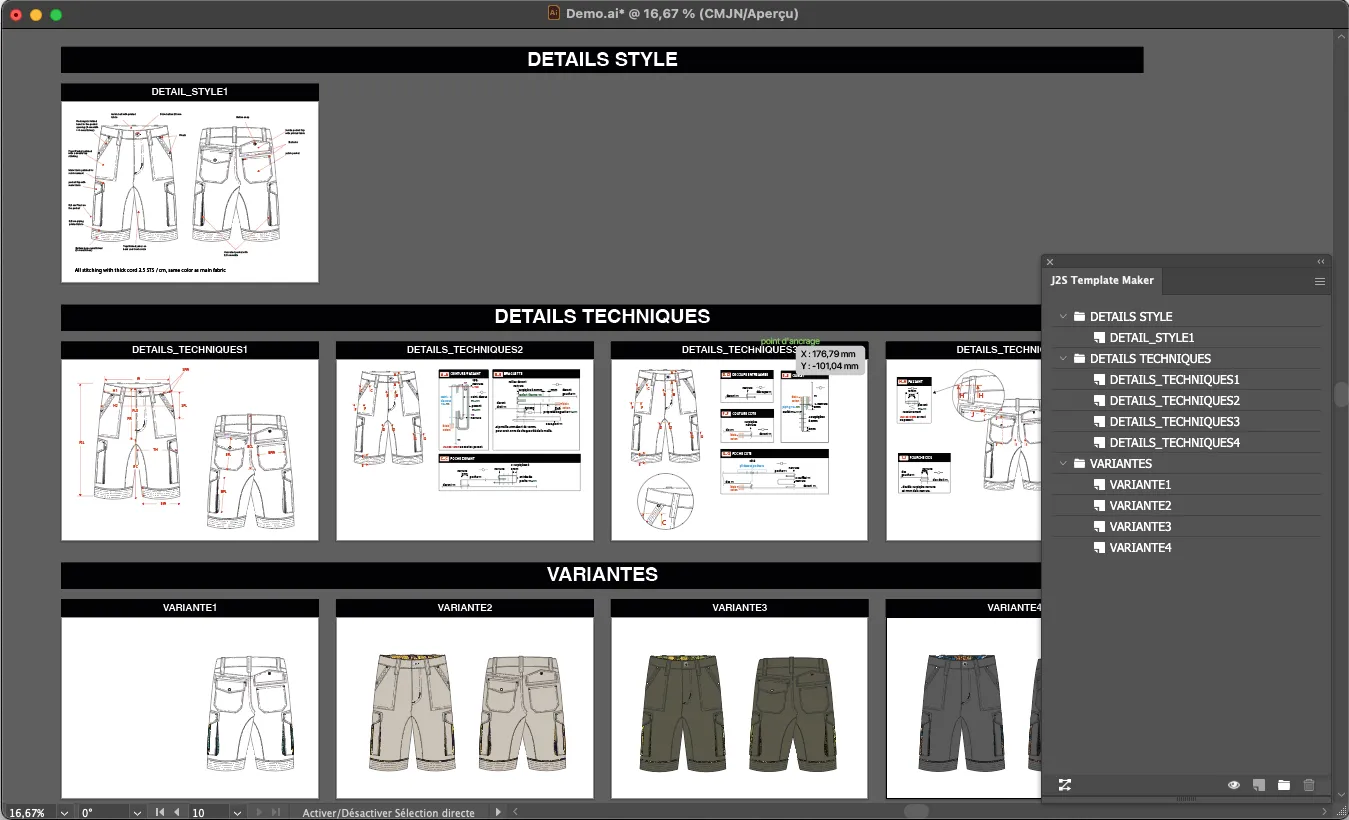
Rather than starting with a document containing every possible section and artboard, J2S Template Maker allows users to add them dynamically as required.
Users can build their documents progressively, selecting only the elements needed for the product they are working on.
This approach offers several advantages.
It avoids retaining unused artboards, reduces the need for complex templates and helps keep file sizes down.
Teams can therefore work with documents that are better suited to their actual requirements.
The latest version also allows artboards to be organised according to different roles and departments, such as designers, pattern makers and technical teams.
Simplify artboard naming
During the design process, the names assigned to sections and artboards are more than a minor detail.
They help identify content and make it easier to use in subsequent stages of the workflow.
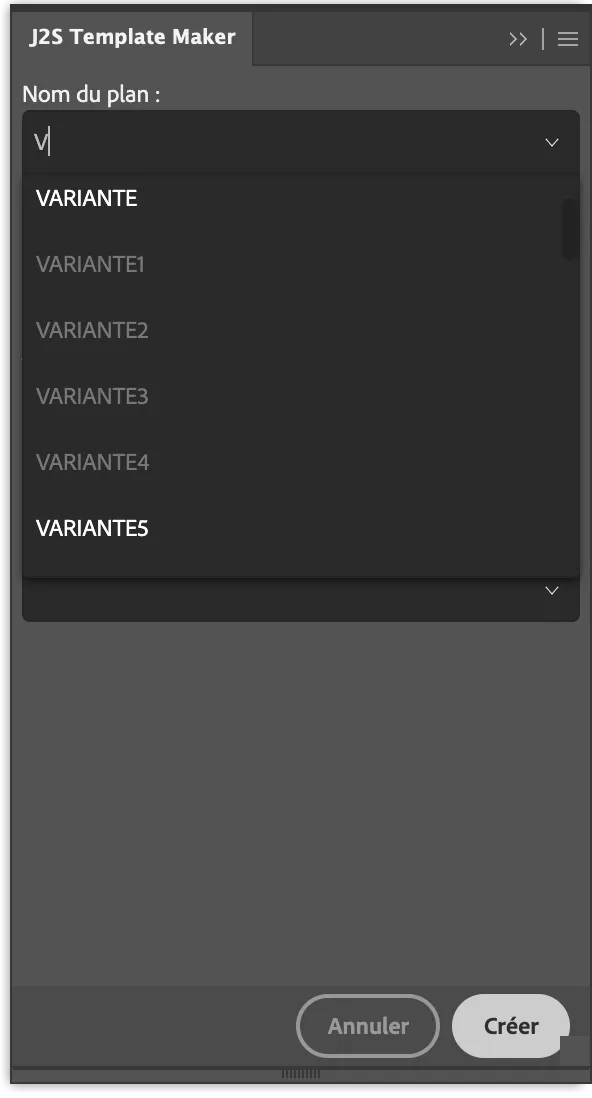
J2S Template Maker allows companies to apply their own naming conventions.
Its panel includes autocomplete suggestions to guide users when selecting names.
This feature helps reduce typing errors and ensures greater consistency across documents.
It also makes visual assets easier to identify when exporting them.
Automatically rearrange artboards
Requirements change throughout collection development.
Teams may need to add a new view, change the order of sections or move certain artboards.
In a complex document, these changes can involve several manual operations.
With J2S Template Maker, users can rearrange sections and artboards directly from a dedicated panel.
Their layout is then automatically updated in Illustrator, according to the settings defined by the company.
This feature makes it easier to adapt a document’s structure without having to reorganise everything manually.
Automate the export of visual assets
Visual assets prepared in Illustrator are often intended for use in other applications.
They may be incorporated into technical sheets, collection overviews or product information management systems.
J2S Template Maker simplifies their export to a designated folder.
This folder can then be used as part of a synchronisation process with other applications, including a PLM (Product Lifecycle Management) system or a digital asset management system.
The aim is to simplify the preparation of content for subsequent stages while reducing manual operations.
Reducing Illustrator file sizes: a practical way to improve productivity
Organising artboards is not simply about making documents easier to use.
It also addresses an everyday challenge: file size.
In some companies, Illustrator documents are stored and shared on internal servers.
When these files become too large, they can take longer to open and save, while also consuming significant storage space within the PLM system.
These constraints are particularly noticeable when teams work on numerous designs or regularly exchange files.
By allowing users to create documents containing only the sections they need, J2S Template Maker helps prevent unnecessary elements from accumulating.
The solution can also display an alert when a file exceeds a predefined size.
Users can therefore be warned before a document becomes excessively large.
This feature does not replace good file management practices, but it helps teams maintain greater control over their working environment.
Reducing document size also means reducing the time spent opening, saving and transferring files.
How can Illustrator assets be connected to collection management tools?
Technical drawings created in Illustrator represent only part of the information required to develop a collection.
Teams must also manage product references, fabrics, colourways, product specifications and the various stages of development.
This information can be managed in a PLM system.
The role of PLM software in fashion
A PLM system centralises and organises information associated with the product lifecycle.
In the fashion industry, it helps teams manage the development of individual designs and entire collections.
However, creative teams continue to use specialised applications such as Adobe Illustrator to produce their visual assets.
The challenge is therefore to make it easier for these different environments to work together.
The aim is not to replace Illustrator or the PLM system, but to make better use of the information and content available in each application.
Interoperability with Centric Software
J2S Template Maker is designed to work with the Illustrator extension provided by Centric Software as part of its PLM environment.
This compatibility made it possible to integrate the organisation and export of Illustrator assets into a broader product information management workflow.
The available integration options naturally depend on the applications and software versions used by each company.
This approach illustrates an important principle: digitising creative workflows does not necessarily mean introducing more applications. It often means enabling existing tools to work together more effectively.
From technical drawings to technical sheets and collection overviews
Automating operations within Illustrator is a first step.
However, the visual assets created by designers and product development teams can also be used in documents required to manage and monitor products.
These include technical sheets and collection overviews.
Reusing visual assets in technical sheets
A technical sheet brings together the information required to describe and develop a garment.
Depending on the company’s requirements, it may include technical drawings, fabric details, colourways, product specifications and other information needed by the teams involved.
Visual assets created in Illustrator can therefore represent an important part of its content.
When these assets are exported and manually inserted into documents, every change may require further adjustments.
Better organisation of files and exports makes them easier to reuse.
Combined with product information available in business systems, these assets can support an automated document production workflow.
Producing collection overviews
Collection overviews serve a different purpose.
They allow teams to visualise several designs and obtain an overall view of a collection.
These documents can help teams compare products, monitor development and support decision-making.
Like technical sheets, they can draw on Illustrator assets and the product data associated with them.
As collections evolve, keeping these documents up to date can become particularly time-consuming if each one must be edited manually.
Automation makes it possible to reuse existing content within appropriate publishing templates.
To explore this topic further, read our article on the digital transformation of collection overviews in the fashion industry .
J2S Design: extending automation beyond Illustrator
With J2S Design , J2S helps companies automate the production of documents used throughout collection development.
The solution draws on visual assets and business data to simplify the creation and updating of collection overviews.
Publishing workflows can also be designed to use these same sources to produce technical sheets, depending on the company’s needs and organisation.
The objective is to reduce manual work between design tools, information systems and the documents used by different teams.
J2S Template Maker and automated publishing solutions therefore operate at two complementary levels:
- Within Illustrator, to simplify the preparation and organisation of visual assets.
- During document production, to make it easier to reuse these assets alongside product data.
This continuity improves the flow of content without requiring teams to abandon the tools they already use.
Gémo: a practical example of productivity gains
The value of these features becomes particularly clear in users’ day-to-day work.
At Gémo, J2S Template Maker has been used to simplify the organisation of Illustrator documents.
Cécile Arnauné, a fashion designer and graphic designer, explains:
“J2S Template Maker is a tool that saves us valuable time. Its integration with Adobe Illustrator makes it very intuitive to use, as everything happens within the same environment. Adding an artboard with a predefined name to a section is very straightforward.
We can work with lighter files, which helps us reduce the amount of storage required on our internal servers. They are also quicker to open and save.
Another advantage is that I can rearrange my sections and artboards using the J2S Template Maker panel. With just one click, the document layout is automatically updated according to our business-specific settings. What a time-saver!”
Cécile Arnauné, Fashion Designer and Graphic Designer — Gémo
This testimonial highlights several practical benefits.
Integration with Adobe Illustrator allows teams to continue working in their familiar environment.
Creating and rearranging artboards becomes easier, while smaller file sizes make documents simpler to handle and transfer across internal servers.
The automation focuses on specific tasks that are repeated every day.
It is the cumulative effect of these small operations that can create a significant productivity challenge for design teams.
Which tasks should a fashion design department automate first?
Before introducing new features, it is worth examining how teams actually work.
Not every operation offers the same potential for automation.
The most relevant tasks are generally those that are frequent, repetitive and governed by relatively stable rules.
In an Illustrator-based workflow, several areas are worth considering.
1. Document preparation
When teams use similar document structures for numerous products, creating sections and artboards can be simplified.
The objective is to avoid rebuilding the same elements repeatedly.
2. Content naming
Shared naming conventions make visual assets easier to identify and reduce errors when they are reused.
Automation can help users apply these rules without having to enter every name manually.
3. Rearranging document elements
Structural changes are common during collection development.
Being able to rearrange artboards quickly reduces the number of manual operations required.
4. Exports
Exporting visual assets to business applications is another opportunity for automation.
This process can be simplified through consistent naming conventions and predefined export destinations.
5. Reusing visual assets
Technical drawings may be required in several different documents.
Reusing them in technical sheets and collection overviews reduces the need for copying, replacing and manually laying out content.
6. Controlling file sizes
Finally, monitoring the size of Illustrator documents is important.
Better organised, smaller files can make everyday work easier, particularly in environments where documents are exchanged through shared servers.
These opportunities should be assessed according to each company’s working methods, product volumes and existing tools.
Automating repetitive tasks to protect creative time
In the fashion industry, improving team productivity does not mean asking designers to develop collections faster.
It also means reducing the time spent on the operations surrounding the creative process.
Adding artboards, naming and rearranging them, exporting visual assets or preparing content for technical sheets and collection overviews: these tasks are necessary, but they should not take up more of designers’ and product development teams’ time than required.
Using J2S Template Maker shows how targeted automation can address practical challenges without forcing teams to change their working environment.
At the same time, making better use of visual assets and business data can support a more efficient document production process, from initial product design through to the materials used to manage collections.
The aim is to save teams time while allowing them to retain control over their content and creative workflows.
Would you like to simplify the preparation of Illustrator assets or automate the production of your collection documents?
Discover J2S Design or contact our team to discuss your workflows and identify automation opportunities suited to your organisation.


Would you like to simplify your publishing workflows?
Let's discuss your current processes and explore how to make better use of your data and streamline production.
FAQ – Adobe Illustrator automation in fashion
Can tasks be automated in Adobe Illustrator?
Yes. Adobe Illustrator can be extended with plug-ins and extensions that simplify certain repetitive operations. In the fashion industry, these features can include creating and organising artboards, naming and rearranging them, and exporting visual assets.
What is J2S Template Maker?
J2S Template Maker is a solution developed by J2S for Adobe Illustrator. It simplifies the dynamic creation of sections and artboards, their naming and rearrangement, and the export of visual assets. It can also alert users when files exceed a predefined size.
How can Illustrator file sizes be reduced?
One approach is to avoid keeping unnecessary sections and artboards in documents. J2S Template Maker allows users to build documents according to their actual requirements and monitor file sizes. Other good practices for optimising graphic content may also be needed.
How can visual asset exports be automated in Illustrator?
Automation involves organising artboards, applying naming conventions and defining export destinations. J2S Template Maker simplifies these operations, preparing visual assets for use in other applications.
Can Adobe Illustrator be connected to PLM software?
Yes, depending on the solutions and integrations available. In the fashion industry, PLM systems organise information related to product development. Visual assets created in Illustrator can be used within these environments. J2S Template Maker was originally developed to work with the Illustrator extension associated with Centric Software’s PLM solution.
How is Illustrator used to create collection overviews?
Technical drawings and other visual assets prepared in Illustrator can be used to produce collection overviews. Combined with product data from a PLM system or other business applications, they can populate document templates and make updates easier.
Does Illustrator automation replace the work of fashion designers?
No. The objective is to simplify repetitive tasks surrounding the design process, such as document preparation, artboard organisation, naming and exporting. Creative decisions, garment development and business approvals remain the responsibility of the relevant teams.

R. Loubéjac
Cofounder of J2S